

Forgetting your own mobile number happens to almost everyone at some point, especially when you’re juggling work, family, and a dozen other things on your phone. For Zain users in Saudi Arabia, this is an easy problem to fix once you know the right code or method to use.
Whether you need your number for a government e-service like Absher, a quick recharge, or simply to share it with someone, there’s a fast and free way to retrieve it on the spot. You don’t need internet access, app login, or even an active balance to make this work.
This guide walks you through every reliable way to check your Zain number in 2026, from the quick *144# USSD code to SMS, app, and customer service options. By the end, you’ll also know how to handle balance checks, recharges, and special situations like SIM replacement or factory resets.
What is the Zain Number Check Code?
The Zain number check code is a short USSD command that instantly shows your Zain Saudi Arabia mobile number on your screen. The most common code is *144#, which displays your number the moment you dial it.
This service works whether you’re prepaid or postpaid, and you don’t need internet access or app login to use it. It’s the fastest way to confirm your own SIM number when you’ve forgotten it.
Why You Need to Check Your Zain Number
Most people forget their own number simply because they rarely dial it themselves. You only really need it when someone else asks for it, or when a form requires it.
Knowing your Zain number quickly saves time during government portal logins, account verifications, or when setting up a new device.
Common Scenarios Requiring Your Zain Number
You’ll often need your number for things like topping up using a zain recharge code, contacting the zain customer care number, running a zain balance check code, or doing a zain sim number check after switching phones or SIM trays.
These situations come up more than people expect, especially for users juggling multiple SIMs or new arrivals in Saudi Arabia who haven’t memorized their number yet.
Zain Number Check Code: Primary Methods
There are several reliable ways to find your Zain number, ranging from instant on-screen codes to SMS-based replies.
Each method works without needing a balance, so even an inactive or empty-credit line can still retrieve the number.
Method 1: The Quick USSD Code (*144#)
Dial *144# from your Zain SIM and press call. Your Zain mobile number will pop up in a notification on your screen.
This works even if you have no credit or balance on your line, making it the most dependable first option.
Method 2: Alternative USSD Code (*23#)
If *144# doesn’t respond, alternative codes like *23# or *34# can also display your SIM number.
These backup codes are useful on older devices or during temporary network glitches.
Method 3: Check Number via SMS to 700123
Send a blank SMS to 700123, and you’ll receive an automatic reply containing your Zain number.
This SMS-based method also lists every Zain number registered under your Iqama or national ID, not just the one in your phone.
Advanced Methods to Check Zain Number
Beyond the basic codes, Zain also offers app-based, web-based, and in-person ways to retrieve your number.
These are handy if USSD codes fail or if you want to manage your account more broadly while you’re at it.
Method 4: Using the Zain KSA Mobile App
The Zain KSA app includes biometric login and eSIM activation support, and your number is visible right on your profile or account screen.
It’s a good option if you’re already logged in and want to check balance or usage details alongside your number.
Method 5: Zain Online Portal (My Account)
Logging into Zain’s online “My Account” portal also displays your registered number along with billing and usage history.
This works well for postpaid users who already manage their account through a browser rather than the app.
Method 6: Contact Zain Customer Service (959)
Dial 959 from your Zain number for free customer service access 24/7, or call 0590000959 from another network.
Representatives can assist with number verification along with account inquiries and technical support.
Method 7: Check Physical SIM Card Packaging
Your original SIM card packaging or activation slip usually has the number printed directly on it.
This is a simple backup if you still have the SIM packet stored somewhere at home.
Zain Number Check: All Service Codes Summary
Zain offers a wide set of short codes covering number checks, balance, data, and recharges all without needing an app.
Saving this list makes day-to-day account management faster and removes the need to call support for routine checks.
Complete USSD Codes List
Dial *142# to instantly view your remaining talktime balance, and dial *405# to check your internet data balance instantly.
For recharging, dial 141 followed by your voucher code and end with # to load funds to your account.
SMS Service Codes
Send “BC” to 959 to check your remaining data across all internet bundles via SMS.
You can also text an empty message to 959 to check your balance and credit expiration date.
Voice Call Services
Calling 959 from a Zain number is free 24/7, and it connects you to both automated IVR menus and live representatives.
From abroad or other networks, customer service can also be reached at 00966 590 0009 59.
Understanding Zain SIM Numbers in Saudi Arabia
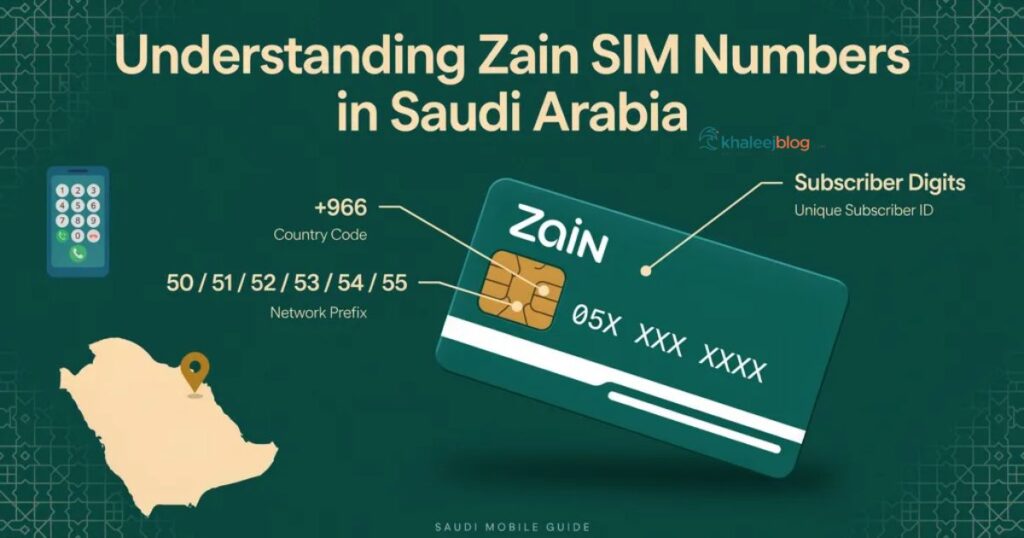
Zain numbers in KSA follow the Saudi mobile numbering system used by all telecom operators in the kingdom.
Knowing the format helps you quickly recognize whether a number belongs to Zain or a different carrier.
Zain Number Format and Identification
Saudi mobile numbers are 10 digits long, starting with 05, followed by an operator-specific prefix and then the subscriber digits.
Zain-specific prefixes fall within a defined range assigned by the Communications and Information Technology Commission (CITC).
Zain Network Identification Codes
Each Saudi operator is assigned specific prefix blocks under 05X, and Zain’s blocks differ from those used by STC or Mobily.
This is why apps and portals can auto-detect “Zain” as your carrier the moment you enter your number.
Checking Multiple Zain Numbers on Your Iqama
Many residents in Saudi Arabia hold more than one Zain line, often for personal and business use.
It’s easy to lose track of which numbers are actually registered to your identity, especially after SIM swaps or replacements.
How to Find All SIM Cards Registered to Your Name
Sending a blank SMS to 700123 returns an SMS detailing all Zain SIM cards allocated to your name, not just your current one.
You can also check the CITC’s “My Numbers” tool on citc.gov.sa to view every SIM linked to your Iqama across all operators.
Zain Number Check for Different User Types
The check methods are largely the same across user types, but a few details vary by plan or status.
Knowing which method suits your account type saves a step or two.
For Prepaid Users
The USSD code *144# works on all devices and is available for both prepaid and postpaid users, so prepaid customers can use it freely with zero balance.
The SMS method to 700123 works the same way for prepaid lines.
For Postpaid Users
Postpaid users get the same USSD and SMS options, plus easy visibility through the online “My Account” portal tied to their billing profile.
This makes the portal a convenient secondary option if they’re already logged in for bill payments.
For Corporate and Business Users
Business account holders can use the Zain Business SMS code service to manage multiple lines under one corporate account.
Zain KSA’s business SMS codes page lists separate help codes sent to 959 specifically for business subjects.
For Tourists and Visitors
All Zain number check methods, including USSD and SMS, work on visitor SIMs in Saudi Arabia, so pilgrims and tourists can use the same *144# code without issues.
This makes it just as simple for short-term visitors as it is for residents.
Read More To Explore KSA: Makkah Bus Route 2026: Complete Guide to Public Transport in the Holy City
Troubleshooting: Common Issues and Solutions
Occasionally a code or method may not respond as expected, usually due to network or device-related reasons.
Most issues resolve quickly with a retry or a switch to an alternative method.
Problem 1: USSD Code Not Working
A failed USSD response usually happens due to weak signal or incorrect input, so rechecking and retrying the code often fixes it.
Restarting your phone or toggling airplane mode can also refresh the connection before you try again.
Problem 2: SMS Not Receiving Reply
If the SMS to 700123 doesn’t get a reply, check that the message body is completely empty and that you’re on a stable signal area.
Trying again after a few minutes or switching to the *144# code in the meantime usually resolves it.
Problem 3: App Login Issues
App login problems are often linked to outdated app versions or incorrect OTP entry during sign-in.
Updating the app and requesting a fresh OTP usually clears this up quickly.
Problem 4: Customer Service Call Challenges
High call volumes to 959 can sometimes mean longer wait times, especially during peak hours.
Using the SMS or USSD method first can resolve simple number checks without needing to wait on a call at all.
Zain Offer Check Code
To check active offers and data usage, dial *405# or send “BC” to 959 for a breakdown of your remaining data and package details.
You can also dial *959# to access the Zain menu, which lists current offers and available services.
Additional Zain Services and Codes
Beyond number checks, Zain bundles several other self-service codes for balance, credit sharing, and roaming.
These are worth saving alongside your number-check codes since they cover most day-to-day account needs.
Balance and Data Checking
Dial *142# or call 959 to check your main balance, and dial *405# or send “BC” to 700212 to check your internet data balance.
Both codes work instantly and don’t require an active data connection to use.
Credit Transfer Service
To send credit, text “bt” followed by the recipient’s number and the amount to 702702, with transfers allowed between 10 and 50 SR.
The receiver then sends their ID number to 702702 to claim the balance, and this transfer doesn’t affect prepaid validity.
Package Activation and Management
Send “offers” to 959 to receive a list of personalized data, voice, and combo packages based on your usage.
To cancel an active plan, send “UNSUB” followed by the offer code to 959.
Roaming and International Services
Send “roam” to 959 for quick access to international roaming plans before you travel.
It’s best to enable roaming a day or two before travel by calling 959 or through the Zain app.
Tips for Managing Your Zain Number
A few small habits make managing your Zain line much less stressful long-term.
These tips apply whether you’re a long-term resident or just here for a short visit.
Save Your Number Immediately
As soon as you check your number using *144# or the SMS method, save it directly in your phone’s contacts under your own name.
This avoids the same forgetting problem from repeating itself later.
Regular App Updates
Keep the Zain KSA app updated so login, OTP, and account features continue working without errors.
Outdated app versions are one of the most common causes of login or display issues.
Security Best Practices
Never share OTP codes or account passwords with anyone claiming to be Zain support over the phone or SMS.
Zain’s official app uses two-factor authentication, so legitimate support will never ask for your one-time code directly.
Multiple Number Management
If you manage more than one Zain line, label each contact entry clearly by purpose (personal, business, family) right after checking it.
This avoids confusion later when you need to recharge or check balance on a specific line.
Zain Number Check for Special Situations
Certain situations make it more likely you’ll need to recheck your number, even if you already know it.
These cases are common enough that it helps to know exactly what to do in each one.
After SIM Replacement
Once a new or replacement SIM is inserted, you can text your Iqama number to 700123 to confirm activation and number details.
This is especially useful if your replacement SIM keeps the same number but you want written confirmation.
For New Zain Subscribers
New subscribers should dial *144# right after activation to confirm the assigned number matches what’s on their SIM packaging.
Once activation is complete, a confirmation message is also sent indicating the SIM is ready for use.
After Phone Factory Reset
A factory reset doesn’t change your number, but it can require re-entering app credentials or re-pairing eSIM profiles.
For eSIM users, a factory reset can delete the eSIM profile entirely, so re-activation through the QR code may be needed afterward.
Understanding Zain’s Customer Rights and Responsibilities
Knowing your rights and obligations as a subscriber helps avoid disputes over billing, activation, or service quality.
These are generally governed by Saudi Arabia’s telecom regulator, CITC, alongside Zain’s own customer policies.
Your Rights as a Zain Customer
You have the right to clear, accurate billing information and to free access to balance, number, and customer service checks at any time.
You’re also entitled to data privacy protections, since Zain states it does not store personal data tied to eSIM profiles beyond what’s needed for service.
Your Responsibilities as a Zain Customer
You’re responsible for keeping your registered Iqama or ID details accurate and up to date with Zain’s records.
You’re also expected to safeguard your SIM, account credentials, and OTP codes to prevent unauthorized use of your line.
Zain Packages vs Other Saudi SIM Providers (2026)
| Provider | Plan Type | Plan Name | Data | Price (SAR) | Validity | Balance/Data Check Code |
| Zain | Prepaid Data | Daily 1-Day | 50MB Zain KSA | 2.3 Zain KSA | 1 day | *405# or *142# |
| Zain | Prepaid Data | Flex 99 (Monthly) | 25GB + unlimited social media Zain KSA | 99 | 30 days | *405# |
| Zain | Prepaid Data | Unlimited Monthly | Unlimited data Zain KSA | 373.75 Zain KSA | 30 days | *405# |
| Zain | Postpaid | Standard 5G Plan | High-speed 5G | 299/month SAUDI EXPATRIATES | Monthly | *142# or 959 |
| Zain | Visitor/Tourist | Visitor 60 | 20GB Zain KSA | 60 Zain KSA | 14 days Zain KSA | *405# |
| Zain | Visitor/Tourist | Visitor 120 | 55GB Zain KSA | 120 Zain KSA | 28 days Zain KSA | *405# |
| STC | Postpaid | Mofawtar Basic | 10GB + 500 minutes | 115 Recruitmentforsaudiarabia | Monthly | 166# |
| STC | Postpaid | Mofawtar Max | Unlimited data, roaming, STC TV Recruitmentforsaudiarabia | 575 Recruitmentforsaudiarabia | Monthly | 166# |
| STC | Visitor/Tourist | Sawa Visitor Plans | 60–360 minutes plus data, varies by plan Zain | Varies | Varies | 166# |
| Mobily | Prepaid | Prepaid Data Plans | Varies by plan | Varies | Varies | #1411 |
| Mobily | Visitor/Tourist | Tourist Data Plans | Widest range of visitor plan options among the three carriers Zain | Varies | Varies | #1411 |
Note on coverage and network choice
When comparing more than just price, network strength matters too. STC offers the widest 4G and 5G coverage in Saudi Arabia, with around 94% network availability, while Zain has a slightly smaller coverage footprint at around 89% availability but often delivers the most data per riyal among the three carriers.
STC and Virgin Mobile (sharing infrastructure) provide the best rural and highway coverage, Zain offers good coverage in most populated urban areas, and Mobily’s rural coverage is more limited, making it best suited for city users.
For quick balance and data checks across providers, remember the codes differ: dial 166# for STC, 142# for Zain, or #1411 for Mobily to check your remaining credit or data instantly.
FAQ’s
What is the fastest code to check my Zain number?
Dial *144# from your Zain SIM and a notification will display your number instantly, even with zero balance.
Can I check my Zain number without using USSD codes?
Yes, you can send a blank SMS to 700123 and receive your number back automatically, or check through the Zain KSA app.
Does checking my Zain number cost anything?
No, all Zain number check methods including USSD codes, SMS to 700123, and customer service calls from Zain numbers are completely free.
How can I see all Zain SIMs registered under my Iqama?
Send a blank SMS to 700123 and you’ll receive a list of every Zain number linked to your Iqama or ID, not just your current SIM.
What should I do if *144# doesn’t respond on my phone?
This usually happens due to weak signal or incorrect input, so retrying the code or restarting your phone usually fixes it, or you can use the SMS method instead.
Conclusion
Finding your Zain number doesn’t need to be complicated, whether you’re a long-term resident or just visiting Saudi Arabia for a short trip. With options like the *144# USSD code, the 700123 SMS service, and the Zain KSA app, there’s always a quick way to retrieve your number without waiting on hold or visiting a store.
Beyond just checking your number, Zain’s broader code system covers nearly every routine task from balance checks and recharges to credit transfers and roaming activation. Saving these codes once means you’ll rarely need to search for them again, even during travel or after switching devices.
If you ever run into an issue that these self-service methods can’t solve, Zain’s customer care line at 959 remains available 24/7 as a reliable backup. Between the codes, the app, and direct support, you should always be able to stay connected and in control of your Zain account with minimal effort.